Skip to content

Free and open-source

Rename lots of files at once, and see the result first

Set up a few simple rules, check every new name, then confirm. For Windows and Linux.

Download for free

Version 1.5.1All releases(opens in a new tab)

See how it works
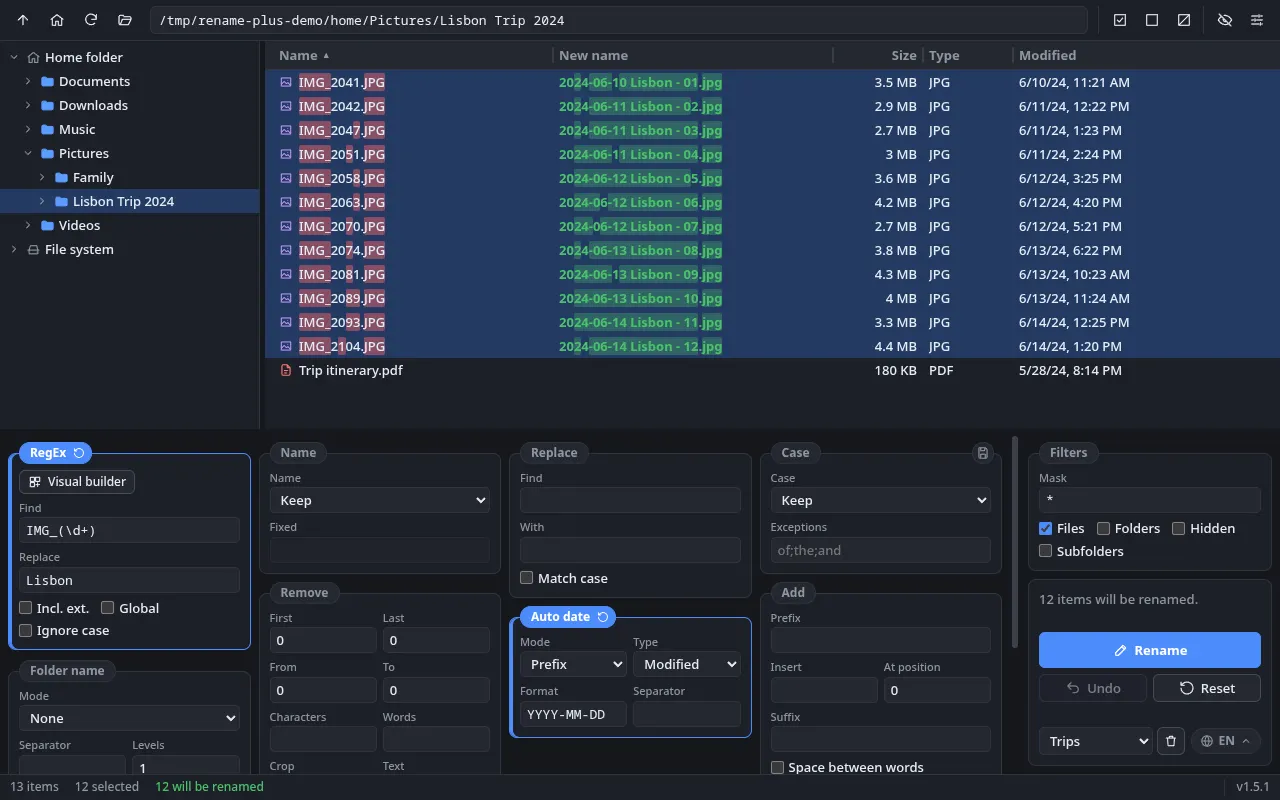
Rename Plus window: folder tree on the left, list of photos with their new names in green on the right and the rule panels at the bottom
The real app window: files on the right, new names in green and the rules below.

The problem

Renaming by hand is slow and error-prone

Holiday photos, invoices, album tracks: naming every file one by one takes ages, and typos slip through.

Names like these, piling up

  • IMG_2041.JPG
  • IMG_2041 (1).JPG
  • DSC_0042.jpeg
  • scan0003.PDF
  • WhatsApp Image 2024-06-11.jpeg
  • Final document FINAL v2.docx
  • track 1.MP3
  • Screenshot_20240612-101532.png

After Rename Plus

  • 2024-06-10 Lisbon - 01.jpg
  • 2024-06-10 Lisbon - 02.jpg
  • 2024-06-11 Lisbon - 03.jpg
  • Invoice 0003.pdf

Features

Everything you need to get names in order

Rules you can combine, with the result on screen before anything changes on disk.

  1. Visual RegEx builder

    Build rules by snapping together blocks like “Start of name”, “Numbers” and “Exact text”. No code required.

    Example:IMG_2041.JPGFoto 2041.JPG

    Technical details

    Generates the regular expression with capture groups (“Match 1”, “Match 2”…) that you can reuse in the replacement. The final expression stays visible so you can check it.
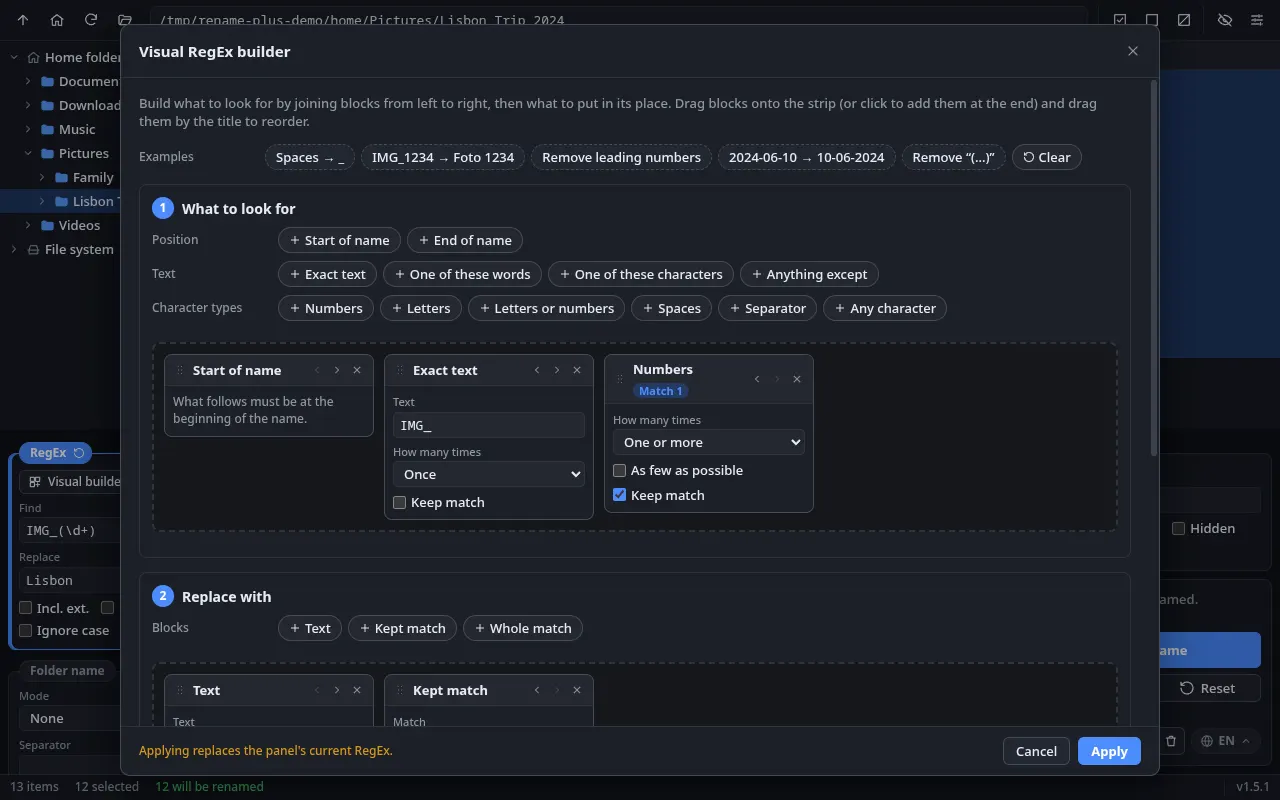
    Visual RegEx builder: the block palette, the search “Start of name + Exact text IMG_ + Numbers (Match 1)” and the replacement “Text + Kept match”

    Visual RegEx builder: the block palette, the search “Start of name + Exact text IMG_ + Numbers (Match 1)” and the replacement “Text + Kept match”

  2. Watch folders

    Pick a folder such as Downloads: every new file that lands there is renamed and, if you like, moved. It even works with the app closed.

    Example:water-bill-october.pdfDocuments/Invoices/2026-10-05 Water Bill October.pdf

    Technical details

    File mask (*.pdf; *.jpg), waits for the file to finish being written, ignores downloads in progress (.crdownload, .part), never overwrites and runs in the background in your session (tray on Windows, XDG Autostart on Linux). Includes an activity log.

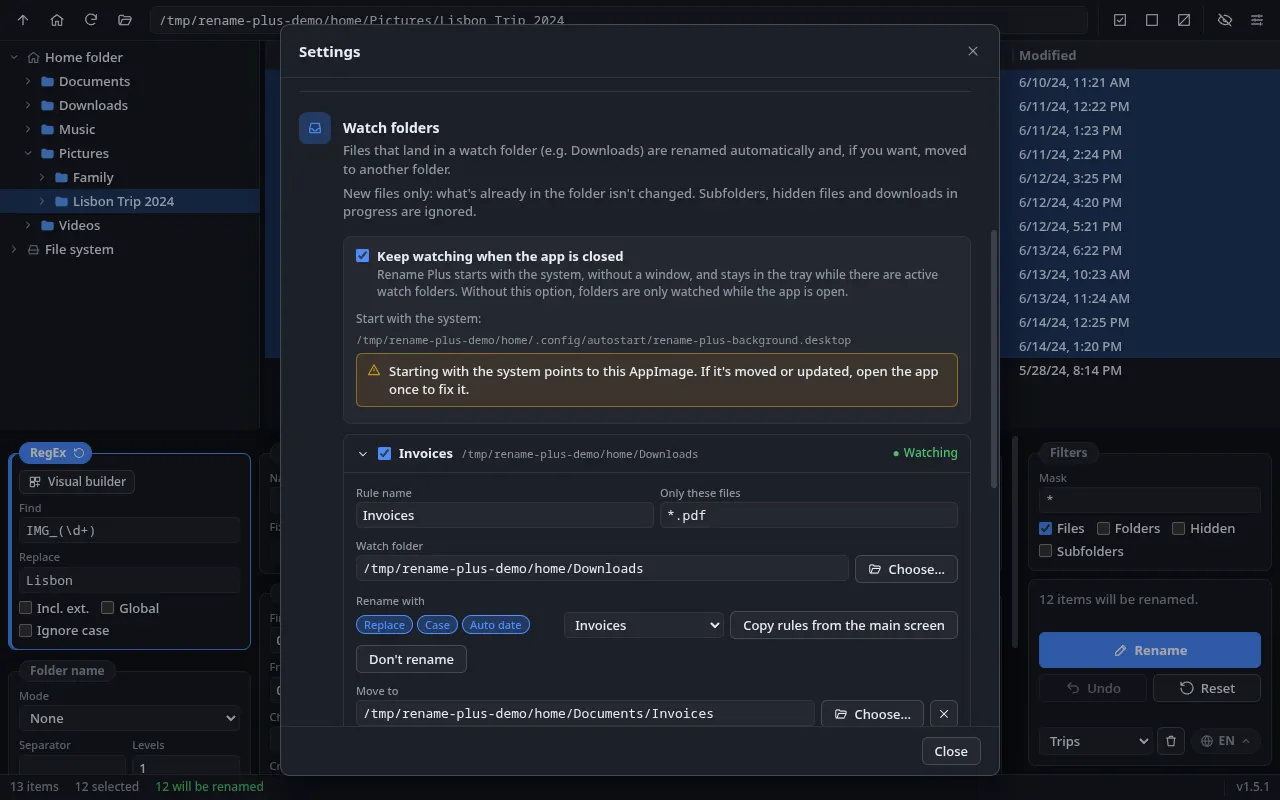
    Watch folders: background mode on and the “Invoices” rule watching PDFs in the Downloads folder, with the renaming rules taken from a preset

    Watch folders: background mode on and the “Invoices” rule watching PDFs in the Downloads folder, with the renaming rules taken from a preset

  3. Presets

    Save a set of rules under a name, like “Family photos”, and apply it again in one click.

    Example:DSC00413.jpg2023-12-03 Family 02.jpg

    Technical details

    Saved presets can also be used as the rules for watch folders.

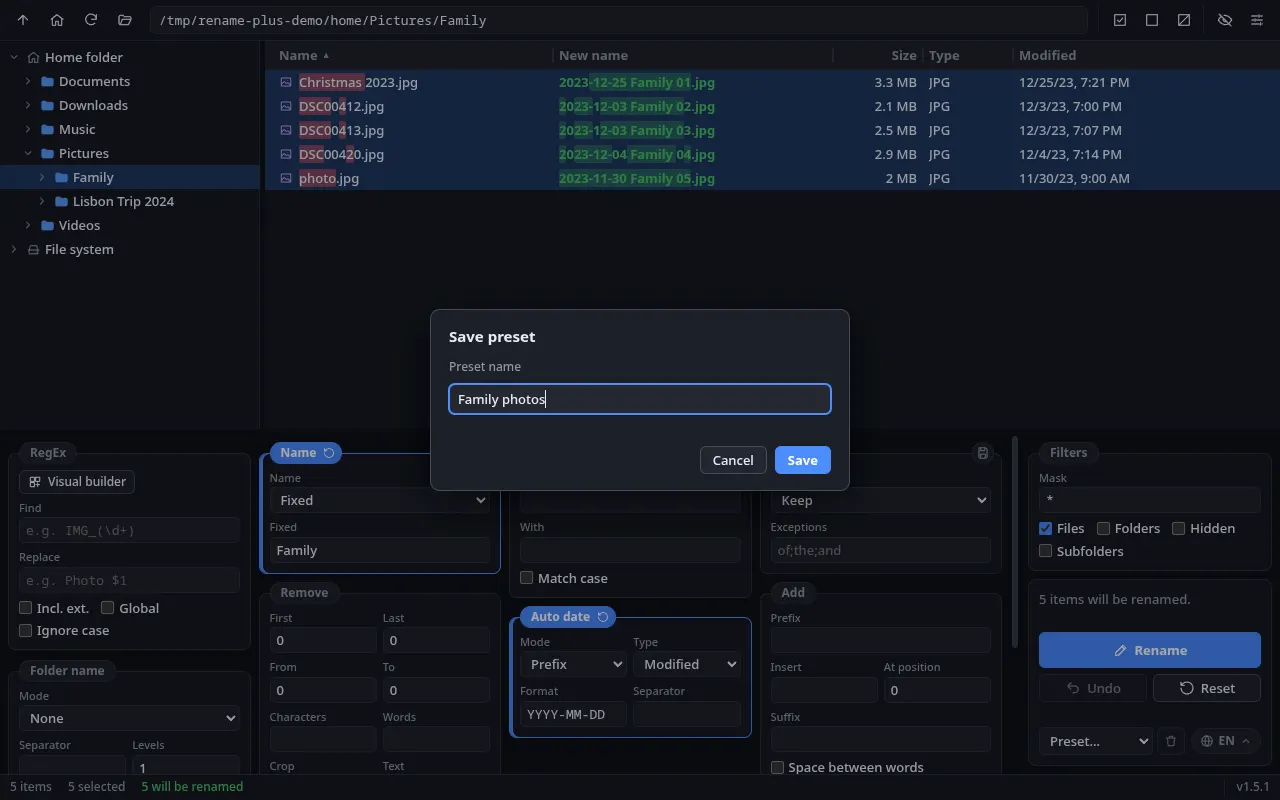
    “Save preset” dialog with the name “Family photos”; behind it, the photos in the Family folder with new names such as “2023-12-03 Family 02.jpg”

    “Save preset” dialog with the name “Family photos”; behind it, the photos in the Family folder with new names such as “2023-12-03 Family 02.jpg”

  4. Windows and Linux

    Runs on Windows and Linux, with a light or dark theme, in English, Portuguese and Spanish.

    • Windows
    • Linux
    • PT · EN · ES
    • Explorer
    • Dolphin
    • Nautilus
    • Nemo
    • Thunar
    • Caja
    • PCManFM
    Technical details

    Electron + React + TypeScript. NSIS installer on Windows and AppImage on Linux. “Open in Rename Plus” in the context menu of File Explorer, Dolphin, Nautilus, Nemo, Thunar, Caja and PCManFM, plus opening from the command line.

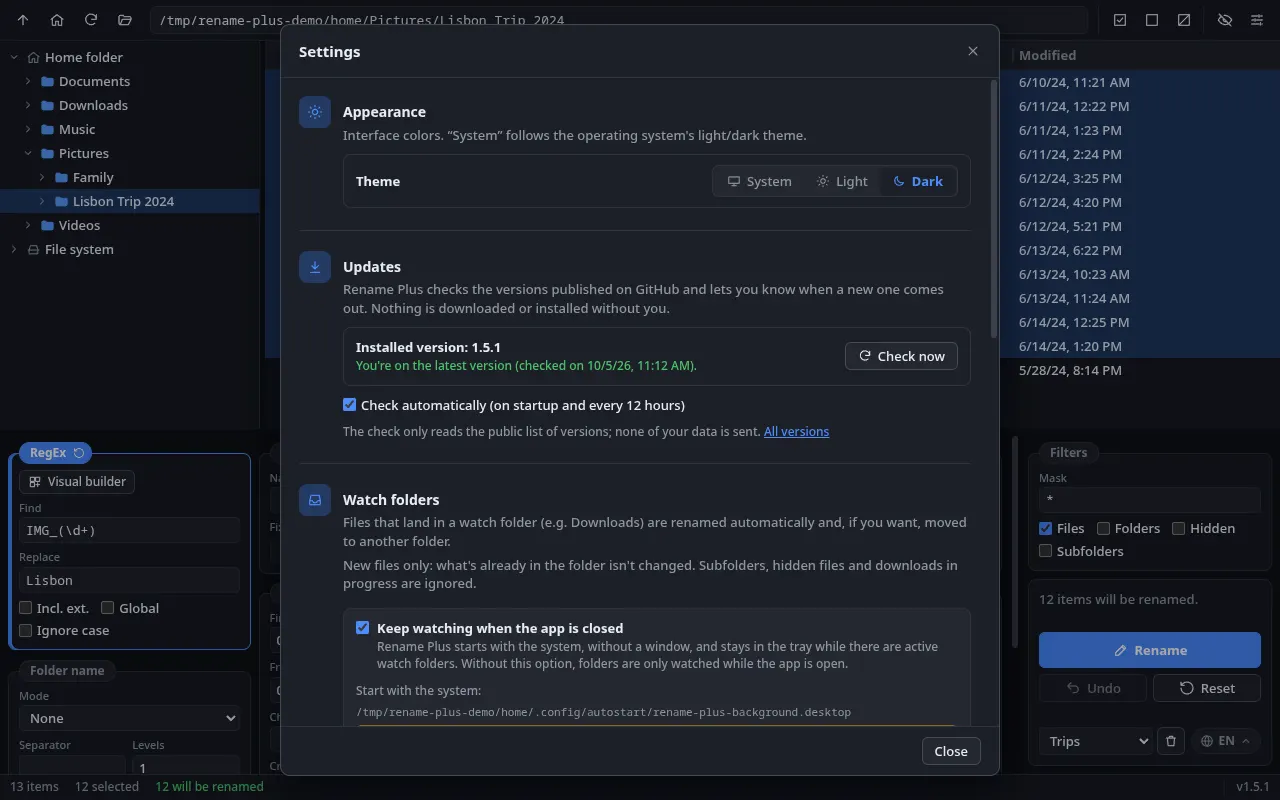
    Settings with the Appearance, Updates and Watch folders sections; the installed version 1.5.1 is the latest

    Settings with the Appearance, Updates and Watch folders sections; the installed version 1.5.1 is the latest

  5. Live preview and safety

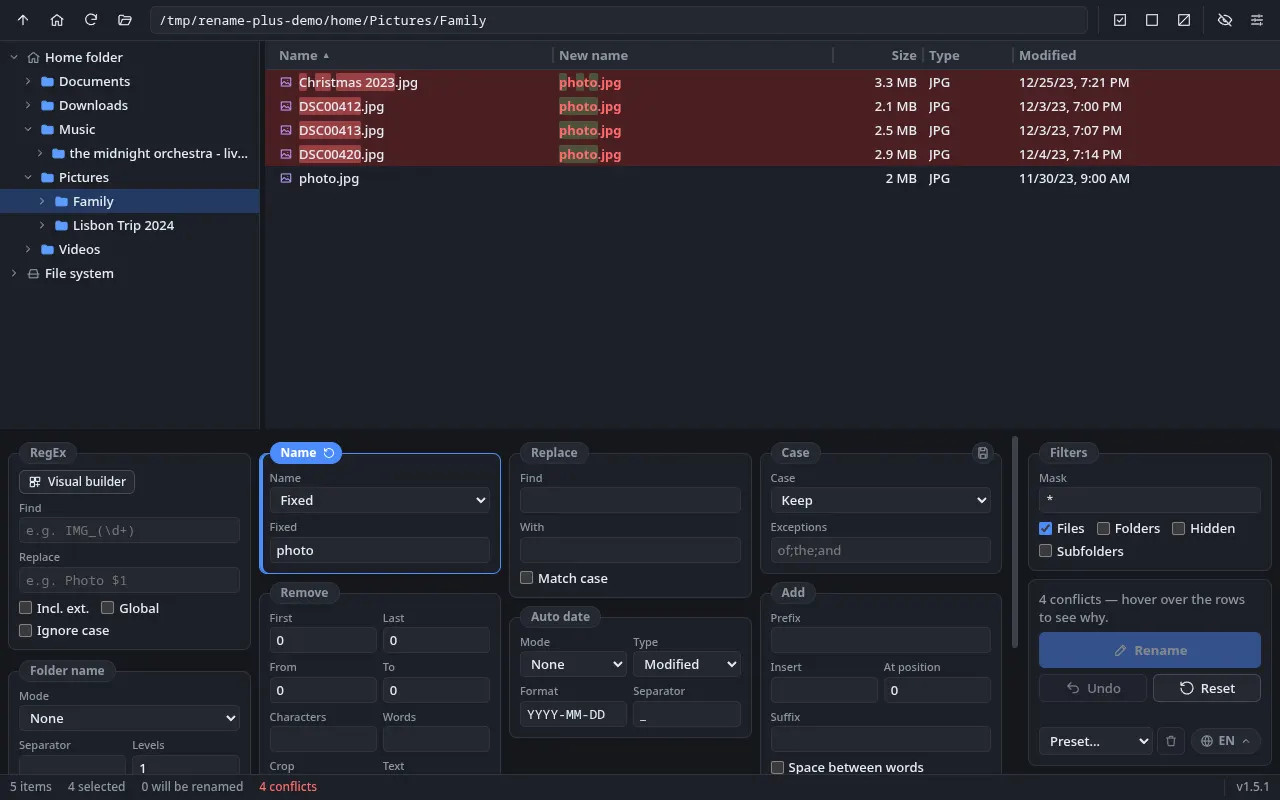
    You see every new name before you confirm. Conflicts show up in red, and you can undo the last batch.

    Example:DSC00412.jpgphoto.jpg

    Technical details

    All-or-nothing renaming in two steps (so files can swap names, a ↔ b), automatic rollback if something fails, checks for names each system forbids (CON, NUL, “/”…) and never overwrites.

    Rows in red with the new name “photo.jpg” repeated; the status bar shows 4 conflicts and the Rename button is blocked

    Rows in red with the new name “photo.jpg” repeated; the status bar shows 4 conflicts and the Rename button is blocked

  6. Rules that combine

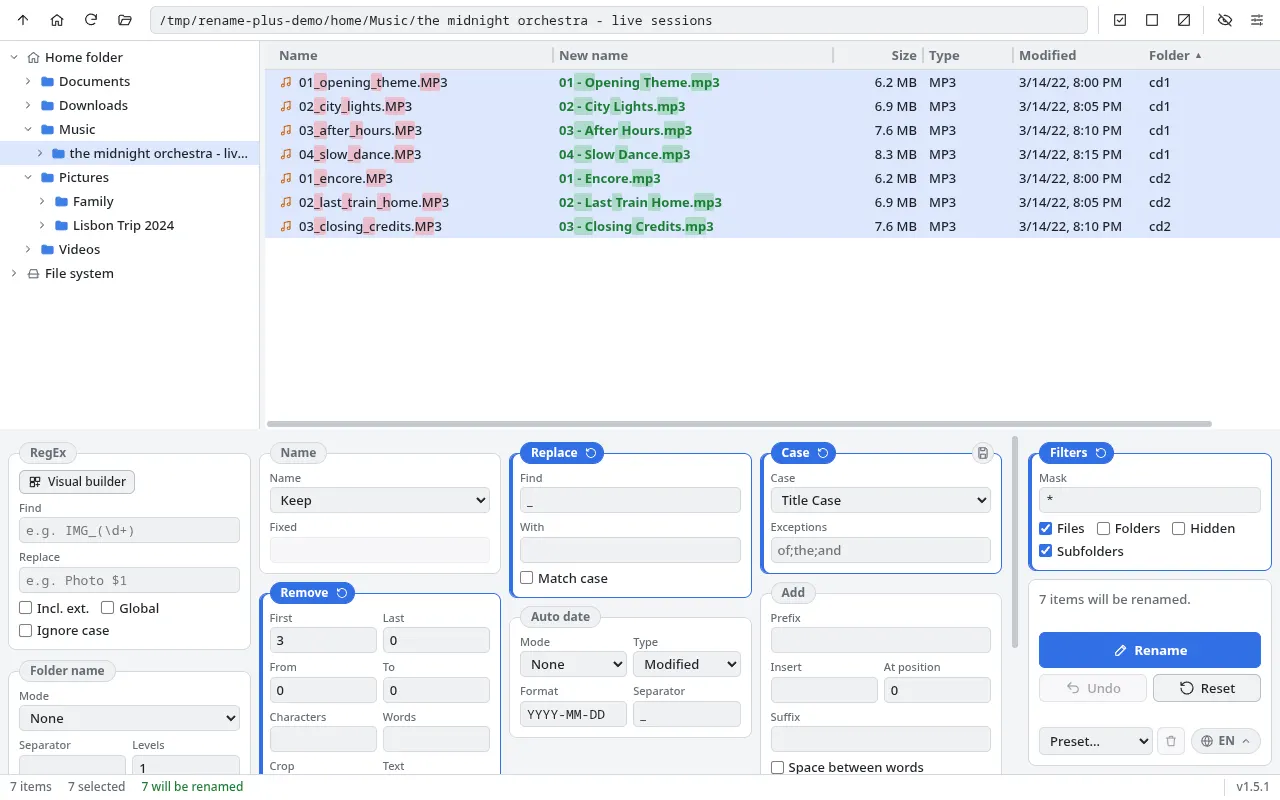
    Replace text, change letter case, add dates, number files, change the extension and more, all at once.

    Example:IMG_2041.JPG2024-06-10 Lisbon - 01.jpg

    Technical details

    Fixed order: RegEx → Name → Replace → Case → Remove → Add → Auto date → Folder name → Numbering → Extension.

    Light theme with Subfolders mode: tracks from two CDs renamed to “01 - Opening Theme.mp3”, with numbering restarting in each folder

    Light theme with Subfolders mode: tracks from two CDs renamed to “01 - Opening Theme.mp3”, with numbering restarting in each folder

Step by step

One file, several rules

Each rule works on the result of the one before, always in the same order.

  1. 0OriginalThe name straight from the camera.IMG_2041.JPG
  2. 1RegExReplaces “IMG_2041” with “Lisbon”.Lisbon.JPG
  3. 2Auto datePuts the file's date in front.2024-06-10 Lisbon.JPG
  4. 3NumberingAdds “ - 01” at the end.2024-06-10 Lisbon - 01.JPG
  5. 4ExtensionMakes the extension lowercase.2024-06-10 Lisbon - 01.jpg

Visual builder

RegEx without memorizing symbols

Blocks snap in from left to right. The app writes the expression for you.

Watch folders

It lands, it gets sorted

A PDF lands in Downloads, gets the date in front, switches to Title Case and moves itself to the right folder.

How it works

Three steps, no surprises

  1. 1

    Open the folder

    From the folder tree, by dragging it onto the window, or with “Open in Rename Plus” in your file manager.

  2. 2

    Set up rules with a live preview

    The “New name” column shows the result for every file as you type.

  3. 3

    Confirm

    Click Rename. Changed your mind? Undo the last batch.

Safety

Nothing changes on disk until you confirm

Rename Plus is built so it won't mess up your files.

  • Preview every name

    The new name shows up first, only for the items you selected.

  • Conflicts in red

    A duplicate name, an existing file or a forbidden character: the row turns red and the Rename button is blocked.

  • All or nothing

    If something fails halfway, whatever was already renamed goes back to its original name.

  • Undo

    Undo the last batch while the app is open. And it never overwrites an existing file.

For developers

Open source, as it is

Rename Plus is open-source under the GPL 3.0 license. Browse the code, open issues and send your contributions.

Stack

  • Electron
  • React
  • TypeScript
  • Vite
  • Vitest
  • Biome
  • electron-builder

Rule order

  1. RegEx
  2. Name
  3. Replace
  4. Case
  5. Remove
  6. Add
  7. Auto date
  8. Folder name
  9. Numbering
  10. Extension

Code structure

src/main
Main process: window, file system, batch renaming, watch folders, updates.
src/preload
Secure bridge between the UI and the main process (contextBridge).
src/renderer
React UI: components, hooks and utilities.
src/shared
Renaming engine in plain TypeScript, covered by tests, the RegEx builder and the UI text in 3 languages.

Transparency

Inspired by Bulk Rename Utility, but independent: written from scratch, using none of its code and with no affiliation with its authors.

What it doesn't do yet

  • Doesn't read metadata (photo EXIF, music ID3).
  • Doesn't run scripts or import name lists from CSV.
  • Doesn't change dates, attributes or permissions; only names.
  • “Undo” covers only the last batch, while the app is open.
  • Lists up to 50,000 items at a time.
  • Doesn't run on macOS yet. On Windows, it's still being validated on real machines.

Get involved

Like it? A star on GitHub helps other people find the project. Found a bug or have an idea? Open an issue.

GPL 3.0 license(opens in a new tab)

FAQ

Quick answers

Is it free?

Yes. You can download and use it without paying anything, on Windows and Linux.

Is it open-source? Can I contribute?

Yes. The code is on GitHub under the GPL 3.0 license. You can open issues with bugs or ideas and send pull requests.

Does it work on a Mac?

Not yet. macOS support is planned. Today the app runs on Windows (64-bit) and Linux (64-bit, AppImage).

Do I need to know RegEx?

No. Most rules are simple fields, like replacing text or numbering. For more advanced searches, the visual builder puts the expression together from blocks.

Does it overwrite files?

Never. If a new name repeats another one or matches an existing file, the row turns red and renaming is blocked. And you can undo the last batch.

Ready to get your files in order?

Free, open-source and no sign-up. Download it and try it on your next messy folder.

Download for free

Version 1.5.1All releases(opens in a new tab)

Windows and Linux, 64-bit. macOS coming soon.